


Lockfy Agent
Lightweight. Silent. Powerful.
The Lockfy Agent is the heart of our endpoint protection—a small, unobtrusive application that runs quietly in the background, ensuring your workstations remain secure without interfering with productivity.
Built for Performance
Security software shouldn’t slow you down. The Lockfy Agent is engineered to be exceptionally lightweight, consuming minimal system resources while delivering continuous session protection.
Resource Usage
| Resource | Lockfy Agent Consumption |
|---|---|
| RAM | < 50 MB |
| CPU | 0% (idle) |
| Disk Footprint | ~100 MB |
| Network | Minimal |
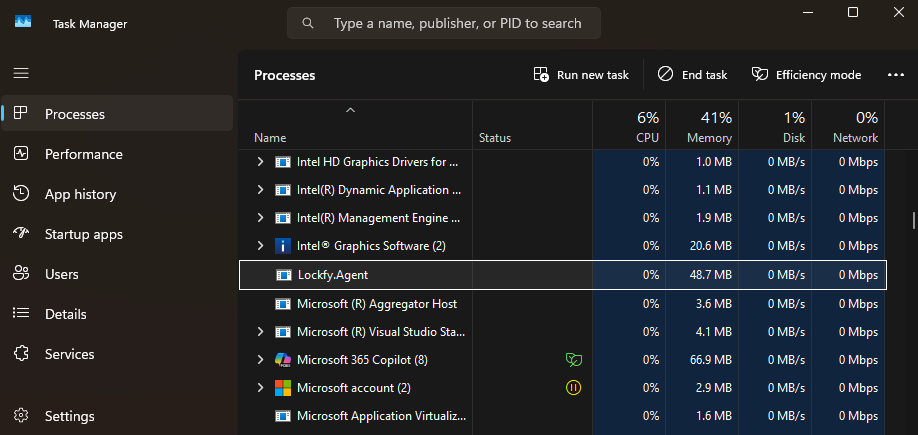
The Lockfy Agent running in Task Manager—less than 50MB of RAM, 0% CPU usage.
Why Lightweight Matters
| Consideration | Impact |
|---|---|
| User Productivity | No slowdowns, no interruptions, no fan noise—users forget it’s there |
| Legacy Hardware | Runs smoothly on older workstations, thin clients, and resource-constrained devices |
| OT Environments | Ideal for industrial control systems, HMIs, and SCADA terminals where every CPU cycle matters |
| Battery Life | Minimal impact on laptop battery life for mobile workers |
| Deployment Scale | Thousands of endpoints without straining infrastructure |
Silent Operation
The Lockfy Agent is designed to work without getting in the way:
- No pop-ups — No intrusive notifications or interruptions
- No user interaction required — Works automatically in the background
- No reboots needed — Installs and updates without restarting workstations
- No conflicts — Compatible with all major antivirus and EDR solutions
What the Agent Does
Despite its small footprint, the Lockfy Agent delivers powerful security capabilities:
| Capability | Description |
|---|---|
| Session Monitoring | Continuously tracks session state—active, idle, locked, unlocked |
| Idle Detection | Detects user inactivity and applies configured lock policies |
| Override Governance | Identifies applications attempting to prevent screen lock and enforces policy |
| Remote Lock/Sign-Out Execution | Receives and executes lock, sign-out, and shutdown commands from the mobile app |
| Activity Reporting | Sends session data to the central console for visibility and audit trails |
| Local Account Management | Manages time-limited local admin credentials |
| Application & Extension Inventory | Collects installed software and browser extension data |
Deployment Flexibility
The Lockfy Agent supports multiple deployment models to fit your environment:
| Deployment Method | Description |
|---|---|
| Manual Installation | Simple powershell installer for individual workstations |
| GPO | Standard Deployment via Group Policy |
| Intune / MEM | Supports Microsoft Endpoint Manager deployment |
| Third-Party RMM | Can be deployed via any remote management tool |
System Requirements
| Requirement | Specification |
|---|---|
| Operating System | All Supported Versions of Windows, runs on older versions but not recommended |
| Architecture | 64-bit (x64) |
| RAM | Minimum 150 MB available |
| Disk Space | 200 MB free |
| Network | Outbound HTTPS connectivity to Lockfy cloud services or On-Prem servers |
Security & Privacy
The Lockfy Agent is built with security and privacy as priorities:
- Signed Binary — The agent is digitally signed by Leira Arabia to ensure authenticity
- Encrypted Communication — All agent-to-server traffic uses TLS 1.2+
- No Data Collection — Only session and security data relevant to the service is transmitted
- Minimal Permissions — Does NOT run on kernal, rather a simple system process with least privilege required to perform its functions
- Regular Updates — Automatic updates ensure the latest features and security patches
Compatibility
The Lockfy Agent is designed to coexist peacefully with your existing security stack:
- All major antivirus products (Microsoft Defender, CrowdStrike, SentinelOne, etc.)
- EDR solutions
- VPN clients
- Virtual desktop infrastructure (VDI)
- Remote desktop services (RDS)
- Legacy applications and OT systems
Frequently Asked Questions
Does the agent work when the user is not logged in?
Yes. The agent runs as a Windows service and is active even when no user is logged in, ensuring that monitoring is enforced even during system startup.
Does the agent require internet connectivity?
Not necessarily, the agent requires outbound connectivity to communicate with Lockfy servers for remote commands and reporting. If connectivity is lost, the agent continues to enforce lock policies and stores data locally. It will automatically try to restore the connectivity and will send all events to the server when connectivity is restored.
Can the agent be uninstalled by users?
In enterprise deployments, users typically do not have permissions to remove the agent. However, when deploying with GPO, it will automatically be reinstalled on reboot.
Does the agent slow down system startup?
No. The agent is optimized for fast startup and typically adds less than 1 second to boot time.
Is the agent compatible with virtualized environments?
Yes. The agent is fully compatible with virtual desktop infrastructure (VDI), Citrix, and remote desktop services (RDS) environments.
Ready to Protect Your Workstations?
Book a DemoLearn how Lockfy Enterprise can provide always-on protection for your organization.