


Browser Extensions Control
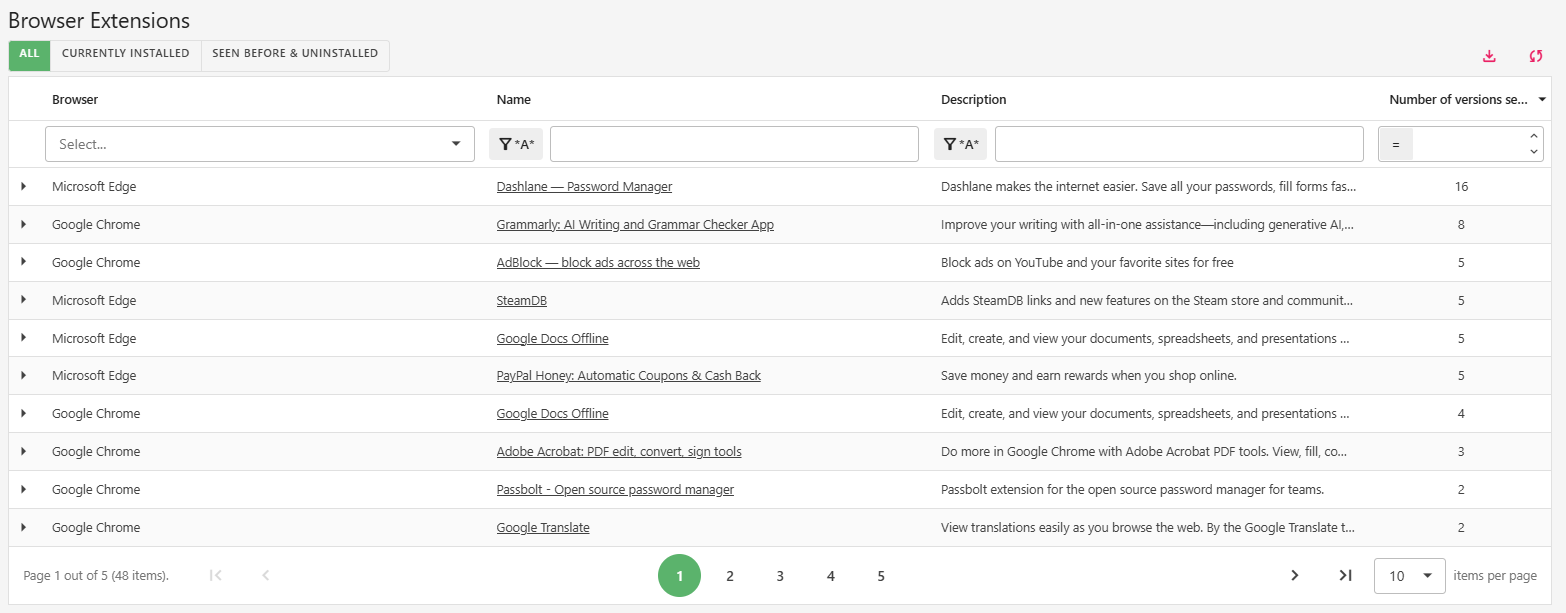
Eliminate the Hidden Risk in Your Browsers
Browser extensions are one of the most overlooked security blind spots. A seemingly harmless extension can exfiltrate sensitive data, capture keystrokes, inject ads, or compromise credentials. With employees using browsers for everything from email to cloud applications to internal systems, rogue extensions represent a critical risk. Lockfy Enterprise provides complete visibility into, and control over, browser extensions across Chrome, Edge, Brave, Firefox and Opera, per user and per profile.
How It Works
Lockfy continuously inventories browser extensions on every managed workstation, providing centralized visibility and risk assessment capabilities.
| Capability | Description |
|---|---|
| Full Extension Inventory | Complete list of all installed browser extensions across Chrome, Edge, Brave, Firefox and Opera |
| Every User, Every Profile | Extensions are inventoried for every browser profile of every user on the workstation |
| Extension Blocking | Block an extension from the portal and Lockfy enforces the block on every managed workstation through each browser’s own policy |
| Personal Profile Coverage | Blocks are enforced even in Edge profiles signed in with a personal Microsoft account, where standard Edge policies don’t apply |
| Browser Restart Action | For browsers that only read policy on startup, Lockfy can restart them so a new block takes effect immediately |
| Live Updates | Inventory updates as extensions are installed, removed, enabled or disabled, and every change can be sent to your SIEM |
| Risk Identification | Identify potentially malicious, high-risk, or non-compliant extensions instantly |
| Violations Report | At-a-glance report of every workstation and profile running a blocked or non-compliant extension |
Why Browser Extensions Matter
| Risk | Impact |
|---|---|
| Data Exfiltration | Extensions can read everything on a webpage, including sensitive data, emails, and cloud application content |
| Credential Theft | Malicious extensions can capture usernames, passwords, and session cookies |
| Ad Injection | Extensions can inject advertisements or redirect traffic to malicious sites |
| Backdoor Installation | Extensions can download additional malware or create persistent access |
| Compliance Violations | Unapproved extensions can violate regulatory requirements for data protection |
Key Benefits
| Benefit | Impact |
|---|---|
| Eliminate Blind Spots | Gain visibility into extensions that IT and security teams never knew existed |
| Prevent Data Loss | Identify extensions that could exfiltrate sensitive information |
| Reduce Attack Surface | Minimize the number of third-party code sources running in your environment |
| Simplify Audits | Generate extension inventory reports instantly for security and compliance reviews |
| Enforce Policies | Identify workstations that violate corporate browser extension policies |
Use Cases
| Industry | Application |
|---|---|
| All Industries | Identify unauthorized or high-risk browser extensions across the organization |
| Finance | Prevent extensions that could capture online banking credentials or payment data |
| Healthcare | Identify extensions that could exfiltrate PHI from EHR systems or patient portals |
| Government | Eliminate extensions that could compromise classified or sensitive systems |
| Energy & Utilities | Protect SCADA and control system interfaces from extension-based attacks |
Ready to Eliminate Browser Blind Spots?
Learn how Lockfy Enterprise can provide complete visibility into browser extensions across your organization.
Ready to Protect Your Workstations?
Book a DemoLearn how Lockfy Enterprise can provide always-on protection for your organization.