


Remote Sessions Control
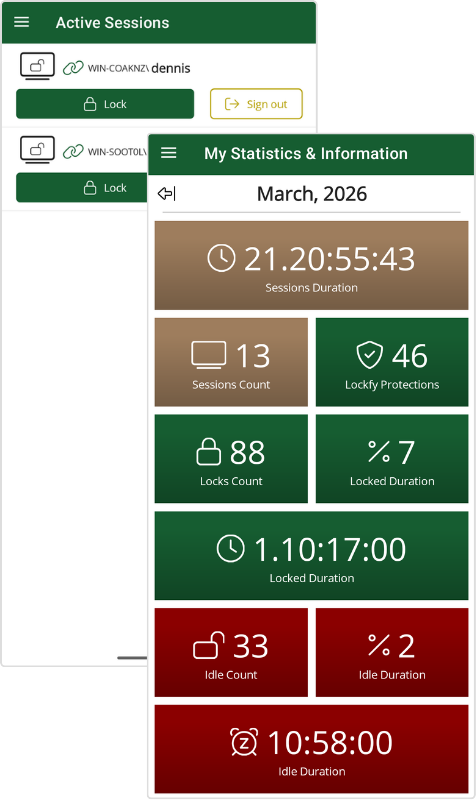
Complete Control from Your Mobile Device
Lockfy Enterprise puts session security in the palm of your hand. Through the Lockfy mobile app, users and IT administrators can remotely lock workstations, sign out active sessions, and manage endpoint security from anywhere. Whether you’re in a meeting, across the facility, or working remotely, you have complete control over your workstations.
How It Works
The Lockfy mobile app connects to managed workstations, providing real-time visibility and control over active sessions. With a single tap, users can secure endpoints without returning to the workstation.
| Capability | Description |
|---|---|
| One-Tap Remote Lock | Lock any managed workstation instantly from your mobile device |
| Remote Sign-Out | Sign out active sessions to ensure complete session termination |
| Real-Time Status | View the current state (locked, unlocked, idle) of all your sessions |
| Multi-Workstation Management | Manage multiple workstations from a single mobile interface |
| Cross-Platform Support | Available for iOS and Android devices |
| Secure Authentication | Mobile app authentication ensures only authorized users can control workstations |
| Admin Portal Control | Administrators can lock or sign out any session in the fleet from the web portal, subject to their permissions |
| Remote Desktop Sessions | Covers RDP sessions as well as console sessions, including on servers and shared terminals |
| Process Control | Administrators can view running processes on a workstation and terminate one remotely |
Key Benefits
| Benefit | Impact |
|---|---|
| Instant Response | Secure workstations immediately without walking back to the device |
| Enhanced Mobility | Move freely between meetings, patient rooms, or production floors without security concerns |
| Centralized Control | Manage all your workstations from a single mobile interface |
| Peace of Mind | Know you can secure your workstation from anywhere, at any time |
Use Cases
| Scenario | Application |
|---|---|
| Walking to a Meeting | Lock your office workstation with one tap as you walk down the hall |
| Code Blue in Healthcare | Nurse locks nursing station computer instantly while responding to emergency |
| Production Floor Issue | Supervisor locks HMI workstation while rushing to address equipment alarm |
| Remote Worker | Lock office workstation from home after realizing you forgot to lock it |
| Shared Environments | Lock previously used shared workstation from your phone after stepping away |
Ready to Take Control?
Learn how Lockfy Enterprise can put workstation security in the palm of your hand.
Ready to Protect Your Workstations?
Book a DemoLearn how Lockfy Enterprise can provide always-on protection for your organization.