


Lockfy Personal
Never Leave Your Computer Unlocked Again



You step away from your computer—just for a moment. A coffee run. A quick meeting. A distraction. In that moment, your unlocked workstation is vulnerable. Anyone passing by can access your emails, files, and personal information.
Lockfy Personal Edition puts security in your pocket. With a simple mobile app, you can lock your computer from anywhere, get instant alerts when you forget, and track your security habits over time. No complex setup. No enterprise IT required. Just peace of mind.
Why Lockfy Personal?
The Problem
You’re busy. You step away from your desk dozens of times a day. Sometimes you remember to lock your computer. Sometimes you don’t. Every unlocked moment is a risk—whether you’re at home, in a coffee shop, or in a shared workspace.
The Solution
Lockfy bridges the gap between your computer and your phone. When you walk away, your phone knows. With one tap, your computer locks. If you forget entirely, Lockfy reminds you. Your data stays yours.
Features
Remote Lock from Anywhere
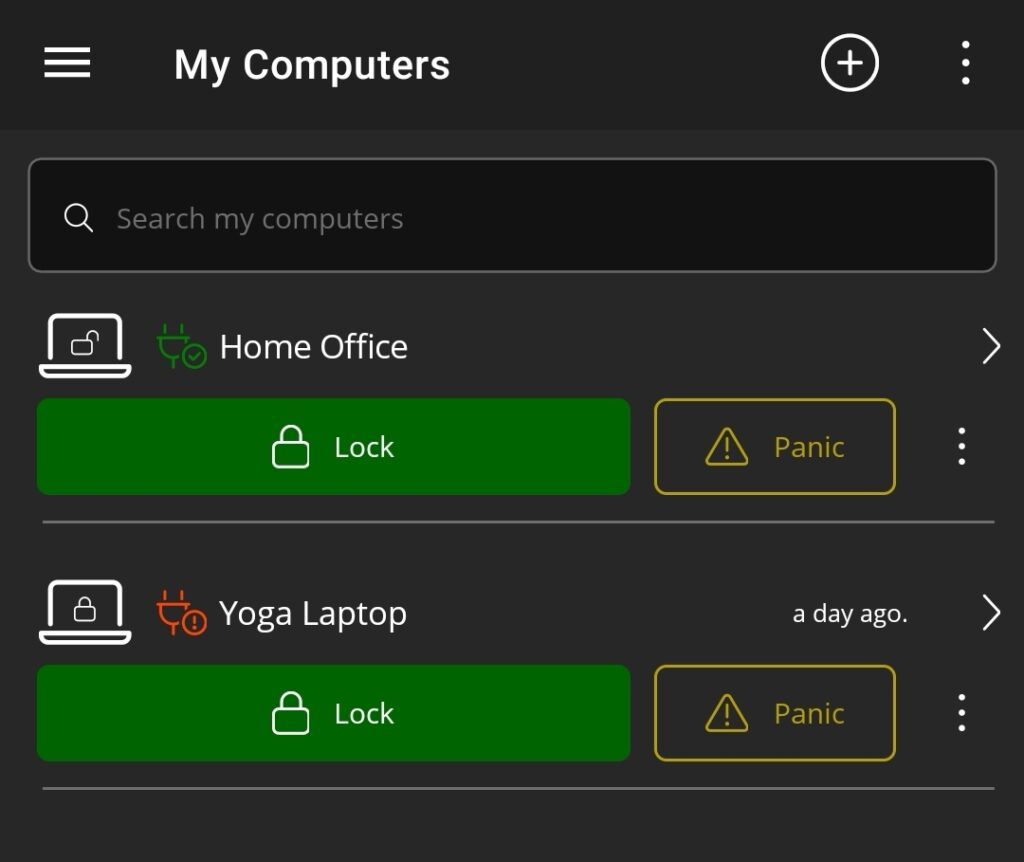
Forget to lock your computer? Lock it from your phone. Whether you’re across the office, in another room, or already halfway home, one tap secures your workstation.
Real-Time Unlock Alerts

Your phone notifies you the moment your computer is unlocked—so you always know when someone is using your machine.
Idle Session Reminders

Lockfy detects when your computer is idle and unlocked. If you walk away and forget, you’ll receive a gentle reminder to lock it.
How It Works
1. Install on Your Computer
Download the Lockfy desktop companion—quick setup with no complex configuration.
2. Install on Your Phone
Get the Lockfy mobile app from your favorite app store.
3. Connect and Go
Your computer and phone stay connected. When you step away, Lockfy has your back.
Key Features
| Feature | Description |
|---|---|
| One-Tap Remote Lock | Lock your computer instantly from your phone |
| Unlock Alerts | Get notified when your computer is unlocked |
| Idle Reminders | Receive alerts when your computer is idle and unlocked |
| Login Notifications | Know immediately when someone logs into your account |
| Security Dashboard | Track your locking habits and progress over time |
| Session History | View detailed records of your computer sessions |
| Cross-Platform | Works with iOS and Android phones, Windows computers |
Who Is Lockfy Personal For?
| Scenario | How Lockfy Helps |
|---|---|
| Remote Worker | Lock your home office computer from your phone when you step away |
| Student | Secure your laptop in the library when you grab coffee |
| Freelancer | Protect client data when working from coffee shops or shared spaces |
| Home User | Keep your personal computer safe from family members or visitors |
| Shared Computer User | Ensure sessions are locked when others use the same machine |
Simple. Secure. Peace of Mind.
Lockfy Personal is designed for people who want security without complexity. No IT department. No policies to configure. Just a simple connection between your phone and your computer that gives you control from anywhere.
- Free to start with essential features
- Upgrade to Professional for advanced statistics and unlimited workstations
- No subscription surprises — simple, transparent pricing
Ready to Never Forget to Lock Again?
Download Lockfy Personal Edition and take control of your computer security from the palm of your hand.
| Platform | Download Link |
|---|---|
| iOS | App Store |
| Android | Google Play |
| Windows | Download for Windows |
Get started today.